Funny Tattoo Shop Review: A Quirky Art Game Kids Love

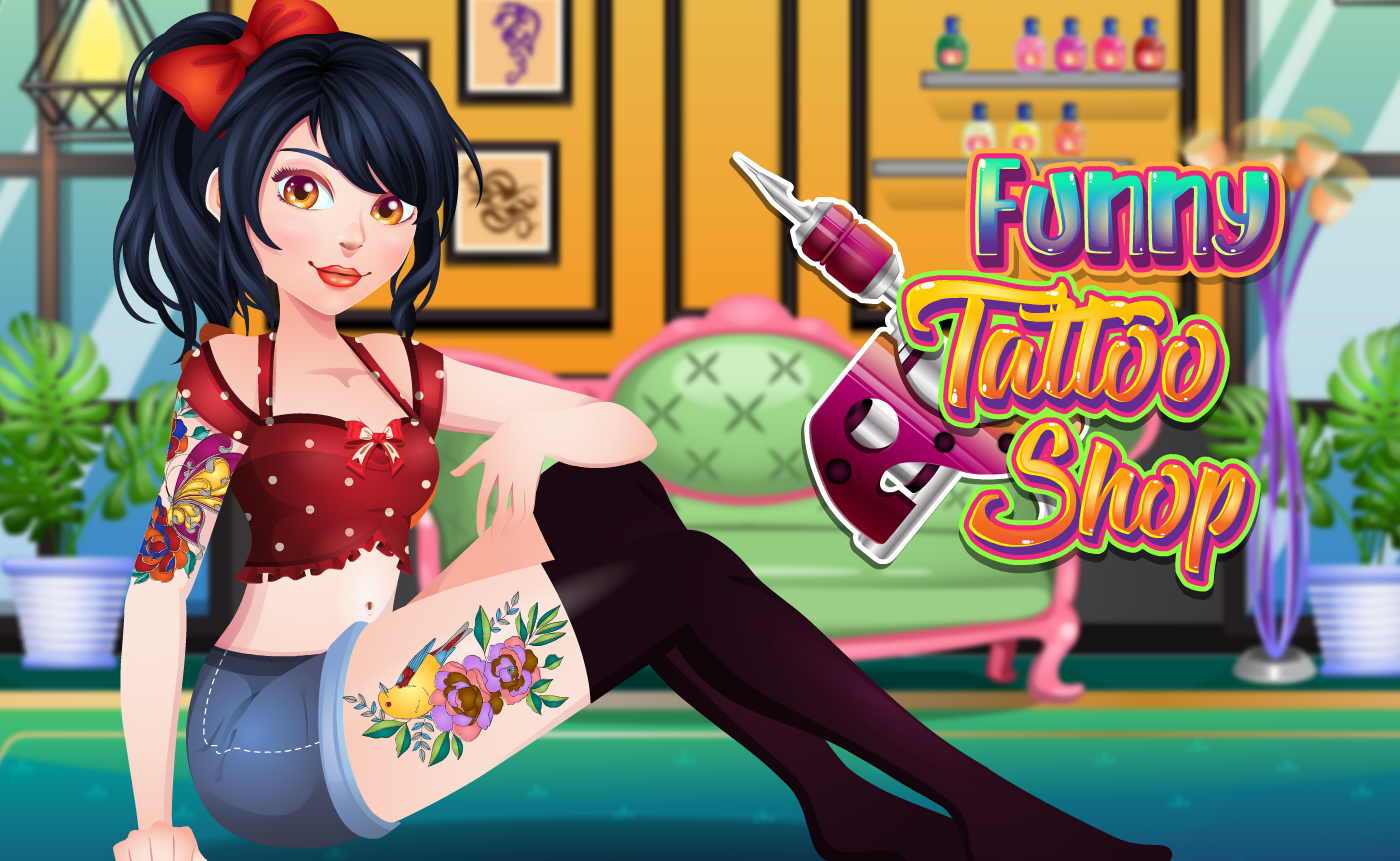
TL;DR: Funny Tattoo Shop is a free browser game where you design tattoos to match outfits. You stencil, color, and place art on a model, unlocking achievements as you go. It's creative, simple, and perfect for kids who love art. The controls take a minute to learn, but the charm makes it worth it.
My niece grabbed the mouse before I could even read the instructions. That's how Funny Tattoo Shop started for us. She saw the bright colors, the cartoon model, and the tattoo stencils, and she was in. No hesitation. I watched over her shoulder as she picked a sunflower stencil, slapped it on the model's arm, and started coloring it neon pink. It looked ridiculous. She loved it. That moment sums up this game pretty well. It's not about realism. It's about mixing a pineapple tattoo with a polka dot dress and seeing what happens.
The game sits in the kids category over at FileReadyNow, and it fits right in. It's a landscape game, 800x600, so it plays nicely in a browser tab without feeling cramped. The whole setup is simple: pick a client, pick their outfit, then design tattoos that match, clash, or just make you laugh. You'll spend most of your time in three steps: choosing a stencil, tracing it onto the skin, and coloring it in. There's no timer, no penalty, no wrong answers. Just pure creative messing around.
What is Funny Tattoo Shop?
Funny Tattoo Shop is a browser-based creativity game where you act as a tattoo artist, designing body art for characters with specific outfit themes. You pick stencils, trace them onto a model, and color them to match or contrast with their clothing. The goal is experimentation, not perfection. It's aimed at kids but honestly works for anyone who wants 10 minutes of low-stakes creative play.
Think of it as a digital coloring book with a fashion twist. Unlike dress-up games where you just click clothes onto a doll, here the focus is on the skin art. The tattoos become part of the outfit. A mermaid stencil on a shoulder paired with a sea-themed dress. A robot tattoo on a calf with futuristic silver pants. The combinations are what make it fun. The game doesn't judge your choices. It just unlocks achievements when you try new things.
How do you play Funny Tattoo Shop?
You play by selecting a client, choosing a tattoo stencil, placing it on their body, tracing the outline, and filling it with color. The whole process uses simple click-and-drag controls. First you pick from a row of stencil designs. Then you position the stencil on the arm, leg, back, or shoulder. Next you trace the dotted outline with your mouse or finger. Finally you pick colors and fill in the sections. When you're done, you see the full look and earn achievements.
The tracing step is the only part that requires any precision. You follow a dotted line, and if you veer off too much, the game nudges you back. It's forgiving. My niece went way outside the lines on her first try and still got a decent result. The coloring step is pure freeform: tap a section, pick a color, done. You can recolor as many times as you want. There's no undo button, which is a small annoyance, but you can just paint over mistakes.
Tips That Actually Work
After a few rounds, I noticed some things that make the game smoother. First, zoom in if your browser lets you. The 800x600 canvas is fine, but some stencil details are tiny. A quick browser zoom to 125% helps with tracing accuracy. Second, don't sleep on contrasting colors. Matching the outfit is the obvious move, but clashing colors often unlock secret achievements. A bright orange dragon tattoo on a pastel blue dress? The game rewards that kind of chaos.
Third, try all the body placements. The shoulder and back give you more tracing space than the ankle or wrist. If you're struggling with a tricky stencil, move it to a larger area. Fourth, the stencil library rotates as you progress. You don't see everything at once. Finishing a tattoo unlocks new designs, so don't get stuck reusing the same three. Push through a few clients to see the weirder options: aliens, pizza slices, lightning bolts.
Is Funny Tattoo Shop good for young kids?
Yes, this game is excellent for kids ages 6 to 12. The controls are simple, there's no reading required beyond basic labels, and nothing is timed or scored harshly. It's a low-pressure creative space. The art style is cartoonish and friendly, with no edgy or scary imagery. Even the "tattoo" theme is handled playfully: think butterflies, stars, and smiling fruit, not skulls or flames.
If you've played games like Toca Boca's hair salon apps or PBS Kids' dress-up games, the vibe is similar. It's sandbox creativity with just enough structure to keep a child engaged. My niece is 8, and she played for 25 minutes straight before looking up. That's a solid run for a free browser game. The only caution: tracing requires some mouse control. A younger child on a trackpad might get frustrated. A mouse or tablet stylus works much better.
What the Experience Actually Feels Like
The first 30 seconds are a little confusing. The game drops you straight into a client screen with no tutorial pop-up. You see stencils, a model, and some buttons. I clicked around blindly for a moment before figuring out the flow. Once you get it, the loop clicks fast. Pick, place, trace, color, admire. The sound effects are sparse: a soft pencil scratch during tracing, a satisfying pop when you finish a section. The music is a bouncy, looping tune that's cute for about 5 minutes. Then it gets repetitive. I turned it off after my third client.
What surprised me was how much the outfit-tattoo pairing mattered to the fun. I expected a basic coloring game. But matching a cactus tattoo to a southwestern print dress felt oddly satisfying. The game has a subtle fashion logic. It's not deep, but it's more than random sticker-placing. The achievements pop up with goofy names like "Ink Master Jr." and "Color Clash Champion," which made my niece giggle every time.
Where It Falls Short
The tracing mechanic, while forgiving, can feel imprecise on a standard mouse. I played on a laptop trackpad at first and struggled. Switching to a proper mouse helped a lot. A touchscreen would be ideal. The game also lacks an undo button. If you color a section wrong, you can repaint it, but if you finish a tattoo and hate the placement, you have to start the whole client over. That's a minor frustration, especially for perfectionist kids.
This game is not for players who want challenge, competition, or deep progression. There's no scoring system, no leaderboards, no timed mode. The achievements are the only long-term hook, and they run out after you've tried most combinations. If you're looking for a game with strategy or skill mastery, this isn't it. But for a creative 10-minute break or something to hand a bored child on a rainy afternoon, it nails its purpose. You can browse our games library if you want something with more competitive bite.
Final Thoughts
Funny Tattoo Shop knows exactly what it is: a silly, colorful, no-pressure art toy. It won't change your life. It will keep a kid happily occupied while you make dinner. The charm is in the weird combinations you discover: a pizza tattoo with a chef outfit, a galaxy sleeve with astronaut pajamas. It's the kind of game that makes you smile at the screen, shake your head, and try one more design.
If you have a young artist in your house, or you just need a mental palate cleanser between work tasks, give Funny Tattoo Shop a try. It's free, it loads fast, and it doesn't ask for anything except your weirdest ideas. For more like this, check out the more kids games section. You might also want to start playing here right now and see what stencil catches your eye first. ▶
Frequently Asked Questions
Do I need to download anything to play Funny Tattoo Shop?
No, Funny Tattoo Shop runs entirely in your browser. There's no download, no plugin, and no account required. Just visit the page and start playing immediately.
Is Funny Tattoo Shop free?
Yes, the game is completely free to play. There are no in-game purchases, no subscription walls, and no premium features locked behind payment.
Can I play Funny Tattoo Shop on a tablet or phone?
The game is designed for landscape orientation at 800x600, so it works best on a desktop or laptop. Tablets in landscape mode handle it decently, but phones feel cramped. A touchscreen actually improves the tracing step compared to a mouse.
How many tattoo designs are in the game?
The stencil library starts small and expands as you complete tattoos. You'll unlock new designs by finishing clients. The exact number varies, but there are enough to keep a child experimenting for a solid 30 to 45 minutes before repeats feel noticeable.
Is there any inappropriate content in Funny Tattoo Shop?
No, the game is firmly in the kids category. All stencils are playful and cartoonish: animals, food, shapes, fantasy creatures. There are no adult themes, scary imagery, or edgy tattoo designs.
Table of Contents
Recent Posts
Racing Against Time: A Thrilling Bridge-Building Challenge
10 hours ago
Mining Rush: A Surprisingly Addictive Strategy Game
1 day ago
Futuristic Archery Fun: Archer 2023 Review
1 day ago
Basketball Twist: Can You Master Drop Dunks?
2 days ago
Survive the Zombie Hordes in This Addictive Shooter
3 days ago
Hoop Dreams in Your Pocket: Dunk Hoop Review
3 days ago