Woodturning Simulator Review: A Surprisingly Calm Craft

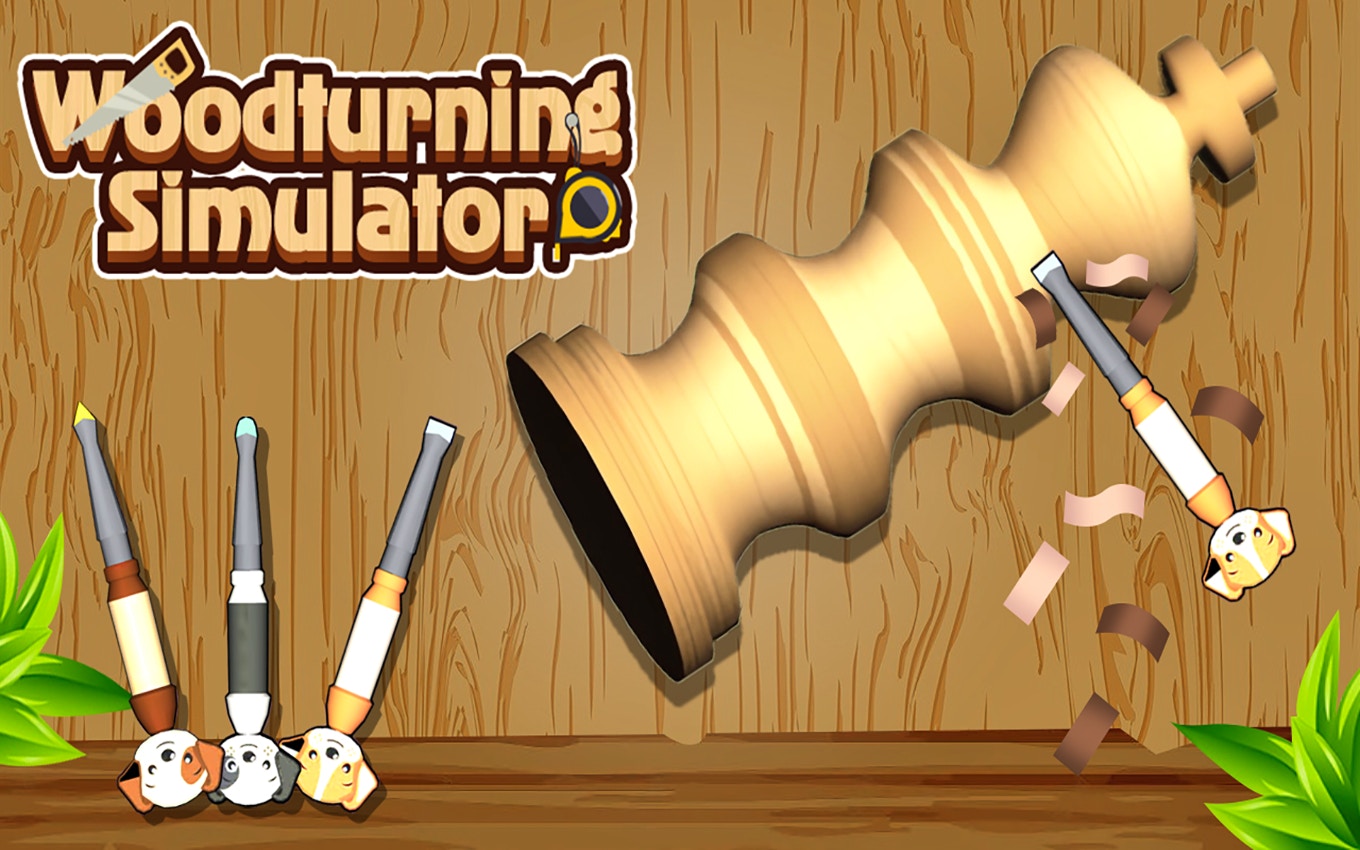
TL;DR: Woodturning Simulator is a free browser game that puts a virtual lathe at your fingertips. You carve wood blocks into shapes by carefully shaving off layers. It's slow, precise, and oddly satisfying. No timers, no enemies. Just you, a spinning block, and a chisel. Perfect for a quiet break.
I stumbled on this game during a slow Tuesday afternoon. My brain felt fried from spreadsheets. I needed something that didn't involve shooting aliens or matching colored gems. The idea of virtual woodworking sounded almost silly. But five minutes in, I was hooked. Woodturning Simulator isn't flashy. It doesn't try to be. What it does is give you a simple lathe and a block of wood. Then it gets out of your way.
That first block looked awful. I gouged it, chipped it, and turned it into a lumpy mess. But the act of doing it felt good. The mouse control mimics a real chisel. You press and drag against the spinning wood. Shavings fly off. The shape slowly emerges. It's a loop I didn't expect to enjoy as much as I did.
What is Woodturning Simulator?
Woodturning Simulator is a free browser game that simulates the craft of shaping wood on a lathe. You control a chisel to carve a spinning block into a target shape. The game scores you on how closely your finished piece matches the blueprint. It's a pure simulation with no timers, no lives, and no distractions.
If you've ever watched woodworking videos on YouTube, you'll recognize the process. The lathe spins the wood. You press a sharp tool against it. Material peels away in thin strips. The game captures that feeling surprisingly well. There's a blueprint overlay showing the shape you need to create. Your job is to remove everything outside that line. Simple concept, but the execution takes patience.
How do you play Woodturning Simulator?
You use your mouse or finger to guide a chisel along a spinning piece of wood. Hold down the left mouse button to apply pressure. Move the tool left and right to shave off layers. Release pressure when you need to reposition. The goal is to match the outline shown on screen. A percentage tells you how close you are to the target shape.
My first few attempts were disasters. I pressed too hard and dug deep grooves into the wood. The chisel bounced. The shape went lopsided. Then I learned to use light, sweeping motions. Short passes work better than long, aggressive ones. The game rewards a steady hand. If you've played other simulation games like more simulation games on this site, you'll recognize the focus on careful control over fast action.
Tips That Actually Work After Playing for an Hour
I spent a solid hour with this game. Here's what I wish I knew from the start. First, ignore the temptation to rush. Speed ruins your piece. The chisel removes material fast when you press hard, but you'll overshoot the outline. Light taps are your friend. Second, work from the edges inward. I start by trimming the ends of the block. That gives me a reference point. Then I slowly move toward the middle.
Third, rotate your view often. The game lets you see the piece from different angles. I missed that feature for the first twenty minutes. Seeing the block from the side reveals bumps you won't notice head-on. Fourth, don't aim for perfection on your first pass. Get the rough shape down, then refine. The game rewards incremental progress. I also noticed the chisel has a slight "stickiness" when you first make contact. That took getting used to. Once I adjusted, my cuts got cleaner.
Is Woodturning Simulator good for relaxation?
Yes, this game is excellent for relaxation. There are no timers, no enemies, and no fail states. You can take as long as you want on each piece. The sound design is minimal. You hear the low hum of the lathe and the soft scrape of wood being shaved. It's a quiet, meditative experience that fits perfectly into a short break.
I played it between tasks at work. It cleared my head. The repetitive motion of carving is almost hypnotic. You get into a rhythm. Tap, drag, release. Check the outline. Repeat. The game doesn't demand anything from you. It just offers a block of wood and a tool. That's rare in free browser games. Most titles want your constant attention. This one is happy to wait.
What's the Catch? Honest Downsides
This game is slow. That's a feature, but also a limitation. If you want action or excitement, you won't find it here. The core loop is carving blocks over and over. The shapes get more complex, but the activity doesn't change. After about 45 minutes, I felt like I'd seen what the game offers. The controls are precise, but they're also simple. There's no depth beyond the carving mechanic.
I also wish there were more feedback. The game tells you your accuracy score, but there's no sense of progression. No levels, no unlocks, no gallery of finished pieces. You finish a piece, get a score, and move on. The wood texture also looks a bit flat. A richer visual would make the carving feel more real. But for a free browser game, these are small quibbles. The core experience works.
Frequently Asked Questions
Do I need to download anything to play?
No downloads are needed. The game runs directly in your browser. Just visit the site and start playing. It works on Chrome, Firefox, Edge, and Safari without any plugins.
Can I play Woodturning Simulator on my phone?
Yes, the game supports all orientations on mobile devices. The touch controls work well. You drag your finger to guide the chisel. It's slightly harder to be precise on a small screen, but still enjoyable.
Is this game good for kids?
Absolutely. There's no violence, no pressure, and no inappropriate content. Kids who enjoy building or crafting will like it. The controls are simple enough for a young player to understand quickly.
How long does a single carving take?
Most pieces take between two and five minutes. Simple shapes go faster. Intricate designs with curves and narrow sections take longer. You control the pace entirely.
Are there other games like this on the site?
Yes, you can browse our games library for more creative and simulation titles. The simulation category includes other hands-on experiences that focus on building and crafting.
Woodturning Simulator surprised me. It's a small, focused game that knows exactly what it wants to be. The act of carving feels good. The lack of pressure is refreshing. I won't play it for hours on end, but I'll return to it when I need five minutes of quiet focus. If you want a break from loud, demanding games, give Woodturning Simulator a try right now. ▶
Table of Contents
Recent Posts
Racing Against Time: A Thrilling Bridge-Building Challenge
10 hours ago
Mining Rush: A Surprisingly Addictive Strategy Game
1 day ago
Futuristic Archery Fun: Archer 2023 Review
1 day ago
Basketball Twist: Can You Master Drop Dunks?
2 days ago
Survive the Zombie Hordes in This Addictive Shooter
3 days ago
Hoop Dreams in Your Pocket: Dunk Hoop Review
3 days ago