Google Announces AI Overviews in Gmail Search and a Smarter AI Inbox

If you’ve been using Gmail for years, you already know how much it changed email when it first launched. Now, Google is trying to reshape email again, this time with AI at the center.
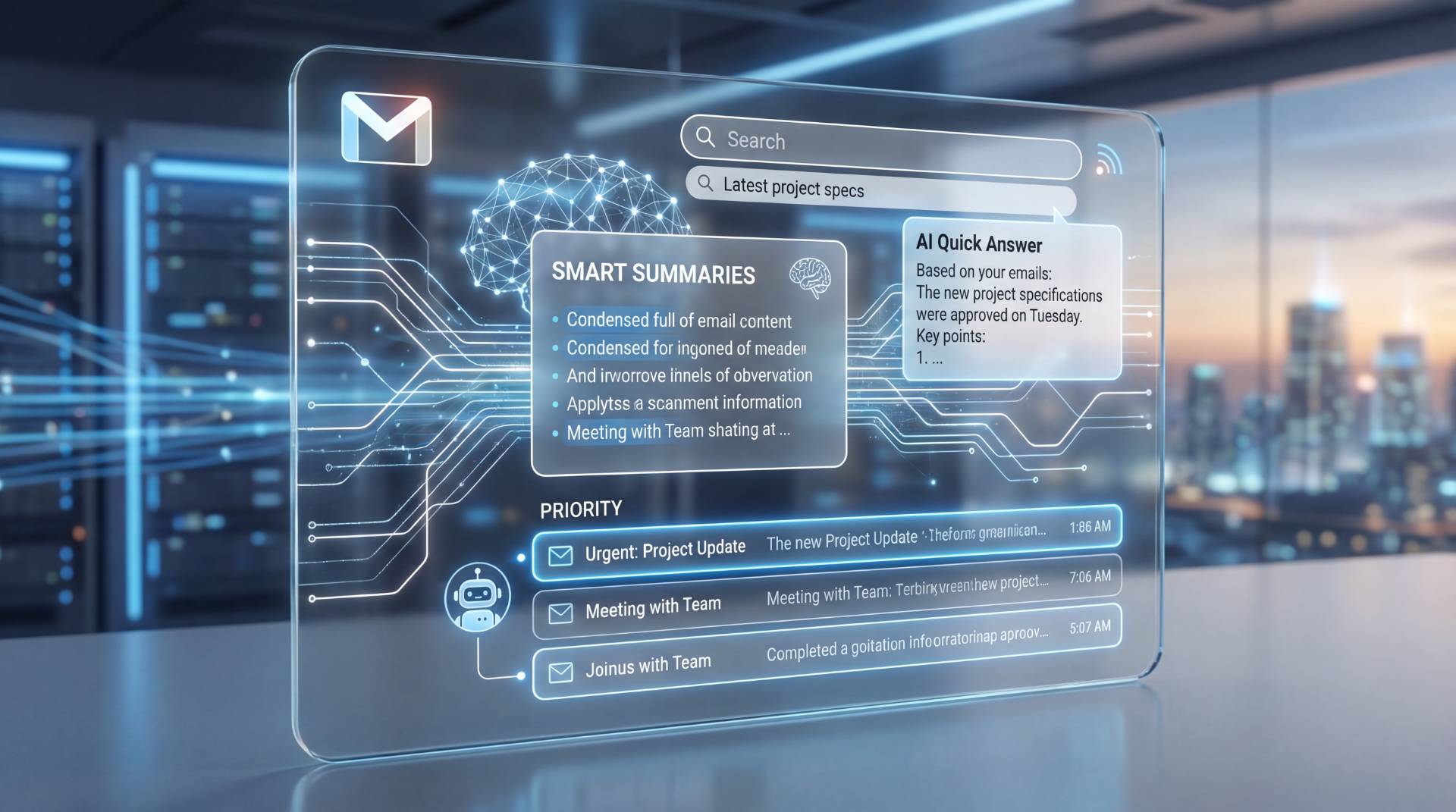
Google has officially announced a new wave of AI-powered Gmail features, including AI Overviews in Gmail search, a personalized AI-organized inbox, and a powerful AI proofreading tool powered by Gemini. Some of these features are rolling out to everyone, while others are starting with paid users.
Let’s break this down in simple terms: what’s new, what actually matters, and how it could change how you use Gmail every day.
AI Overviews in Gmail Search: Find Answers, Not Just Emails
Searching your inbox has always been a bit frustrating. You type a keyword, Gmail shows a long list of emails, and you open a few, hoping one has the answer.
With AI Overviews in Gmail search, that changes.
Now, you can ask natural language questions like:
“Who was the plumber that sent me a quote last year?”
Instead of digging through emails, Gmail’s AI scans your inbox and gives you a clear, summarized answer at the top—along with references to the original emails it pulled from.
This feature feels similar to AI Overviews in Google Search, but there’s an important difference. Here, the AI is grounded in your own emails, which should make the results more accurate and personal.
At launch, AI Overviews in Gmail search are available to Google AI Pro and Ultra subscribers, but based on past rollouts, it’s likely this will reach free users later on.
The New AI Inbox: Gmail That Thinks Ahead for You
Google is also testing a brand-new AI Inbox view, and this is where things get really interesting.
Instead of a traditional list of emails, the AI Inbox organizes your unread messages into actionable insights.
Priorities / Suggested To-Dos
This section highlights emails that actually need your attention, such as:
- A bill due tomorrow
- A reminder to reply to a doctor’s office
- A request you haven’t responded to yet
Catch Me Up / Topics to Catch Up On
Less urgent emails are summarized into short updates like:
- Your order has been delivered
- Your bank statement is ready
- Your return is being processed
The idea is simple: less scrolling, more clarity.
Right now, the AI Inbox is only available to a small group of trusted testers, and Google says it will remain optional when it rolls out more widely.
AI Proofread in Gmail: Built-In Writing Help
If you’ve ever copied an email into Grammarly or ChatGPT just to make it sound better, Google is clearly targeting you.
The new AI Proofread feature in Gmail goes beyond basic spellcheck. It helps you:
- Improve clarity and flow
- Choose better word choices
- Fix awkward or overly complex sentences
- Write in a more concise, active voice
Suggestions appear directly in your draft as subtle underlines, and you can apply them with a single click.
This Grammarly-like proofreading tool is powered by Google’s most advanced Gemini models and is rolling out to AI Pro and Ultra subscribers first.
Free Gmail Users Are Getting More AI Too
Here’s the good news if you don’t pay for AI subscriptions.
Google is moving several previously paid AI features to the free Gmail tier, including:
- Help Me Write – generate emails from simple prompts
- AI Overviews for email threads – summaries of long conversations
- Suggested Replies – smarter, more personalized, quick responses
This means millions of users will now experience AI in Gmail without paying anything extra.
Can You Turn Gmail AI Features Off?
Yes, but there’s a catch.
Google bundles Gemini under “Smart Features” in Gmail settings. Turning it off also disables features like:
- Package tracking cards
- Calendar integration
- Loyalty cards in Google Wallet
So while Gmail AI features are technically optional, disabling them means giving up some genuinely useful tools.
Google also emphasizes that your Gmail content is not used to train its AI models and is processed in an isolated environment.
The Bigger Picture: The AI Future of Gmail
It’s clear that Google sees AI as the future of email. Today, these features are optional and partially locked behind paid plans. But if history is any indication, AI in Gmail will eventually become the default experience.
Whether that’s exciting or slightly uncomfortable depends on how much control users get and how accurate Gemini turns out to be over time.
One thing’s certain: Gmail is no longer just an inbox. It’s becoming a personal AI assistant that reads, summarizes, prioritizes, and even writes emails for you.
Final Thoughts
If you manage a busy inbox, the AI Inbox, AI Overviews in Gmail search, and AI Proofread tools could save you real time.
If you prefer a simple, traditional email experience, Gmail still gives you a choice—for now.
Either way, Gmail’s AI era has officially arrived.
Table of Contents
Recent News

GPT-6 Sol Explained: Pricing, 1M Context Window, Limits, and Who Should Use It
2 weeks ago
Title: Microsoft 365 Copilot Gets a New Prompt Button Inside Word, Excel, and PowerPoint
2 weeks ago
Gemini 3.8 Flash Is Here: Same Price, Stronger Reasoning, and Better PDF Handling
1 month ago
Apple OpenAI Lawsuit Escalates as Both Sides Clash Over Confidential Data
1 month ago
ChatGPT Gets Major File Updates: Voice Uploads, Google Drive Sync, and Better
1 month ago
Adobe Acrobat Now Works Inside WhatsApp and ChatGPT, Bringing PDFs Straight Into Chat
1 month ago